Saturday, September 18, 2021

Project 7: Renaming columns

 Welcome to my blog!  

If you've been here before, welcome back!  Last month, I wrote about my experiences working on a bioinformatics project with some tips for those of you who are interested in data science.  If you haven't read it yet, check out 'Story time:  Bioinformatics research without a computer science degree'.


For this month, I'd like to write about one of the first steps (if not the first step) of working with new datasets:  Renaming columns.

Below is a sample table to illustrate columns and rows.

Row 1:  Number, Age, Gender, Experience, Comments.  Row 2:  1, 80, Male, Yes, Cool.  Row 3:  2, 50, Female, No, Awesome.  Row 4: 3, 67, Transgender, Yes, AFAB.  Row 5: 4, 39, Nonbinary, No, Fabulous. Row 6: 5, 10, Genderfluid, Unknown, None.  Column 1: Number, 1, 2, 3, 4, 5. Column 2: Age, 80, 50, 67, 39, 10. Column 3: Gender, Male, Female, Transgender, Nonbinary, Genderfluid.  Column 4: Yes, No, Yes, No, Unknown. Column 5: Cool, Awesome, AFAB, Fabulous, None


Please note that for this post, we'll be following through the steps using Jupyter.  If you are more familiar using other notebooks, feel free to use what you are comfortable with.


1)  Open your notebook

You can find the screen below by opening the command prompt.  First type in "jupyter notebook" then copy and paste one of the links generated below.

Black screen with white text.  Blue arrow shows input of 'jupyter notebook' and red arrows show links to open Jupyter.

2)  Open a new Python 3 notebook

Once you've opened Jupyter, have a look on the upper right corner.  You should be able to see a button called "New".  If you click on the New button, you should be able to see a menu of new notebooks, folders or files to open.  To select a new Python 3 notebook, click on "Python 3".

The relevant buttons are highlighted in red.
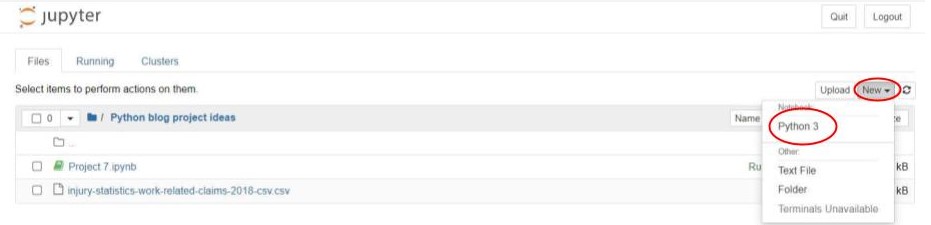
Files in Jupyter notebook.  Red circles highlight 'New' and 'Python 3"


3)  Upload CSV UTF-8 file

First, download the dataset that you plan to analyze.  Convert the file into a CSV UTF-8 format if necessary.  I've found that CSV UTF-8 files are the easiest to upload and analyze using Python 3.  Right next to the New button in 2), there is another button called "Upload".  You can upload your new file using that button.  The file should appear in the menu.

For this post, I will be using the file Injury statistics - work related claims: 2018 - CSV from Stats NZ.  


4)  Pandas library

You can import the pandas library then rename pandas as pd when using functions from the pandas library.  import pandas as pd

Then using the function pd.read_csv(), you can open the CSV file that was uploaded into Jupyter.  It would make things easier to set a variable name for viewing the CSV file later on:

fullset_injury_df = pd.read_csv('injury-statistics-work-related-claims-2018-csv.csv')


Line 1:  import pandas as pd. Line 2: fullset_injury_df = pd.read_csv('injury-statistics-work-related-claims-2018-csv.csv').  Line 3: fullset_injury_df


5)  View dataset

Have a quick look at the dataset.  Take note of the columns and data described to have a good "feel" of the data.  It might help figure out what kind of data analysis might be ideal.  


6)  Identify column names with symbols, and column names with spaces

Have a look at the dataset columns in 4).  Can you find any column names with any symbols?  Spaces even?  These names can become problematic in the future because they will prevent you from being able to use the dot-notation to access the column.

Wait???  What is a dot notation?

Right.  I guess I haven't mentioned it before in any of my past posts.  Mmmm.  I think a few images might help clear things up.

fullset_injury_df['Sex']


Here is an example of calling on a column using [].  It's useful for any kind of column name.

fullset_injury_df.Sex


Here is an example of calling on a column using the dot notation.  It's another way of calling a column name.

Input 4: fullset_injury_df['Geographic region where injury occurred'], Output 4. Input 5:  fullset_injury_df.Geographic region where injury occurred, SyntaxError:  Invalid syntax.


When you try to read column names that have spaces or symbols using the dot notation, you get a syntax error.


Why not just use [] then?  Why would it be necessary to change the column names?

To be honest, in most cases it would be straightforward to use [] to access a column.  However, during my project I encountered a situation when Python 3 kept confusing one of my columns (which had a "." inside) as a file name and made it difficult to read the dataset properly.  I found that renaming column names that can be accessed using dot notation can avoid such nuisances.  


There are three conditions that must be met for column names to be accessed using dot notation:

A)  The column name cannot be a number

B)  The column name cannot include spaces

C)  The column name cannot include symbols

There is an exception to C), as _ is acceptable.


7)  Rename variable names

You can use the .rename(columns = {original column name: new column name}) to change the column name.  In the example below, I changed the name "Geographic region where injury occurred" to "Geographic_region_where_injury_occurred" to replace the spaces with _.  

Input 6:  line 1: #add _ to variable names with spaces. line 2: fullset_injury_df = fullset_injury_df.rename(columns = {'Geographic region where injury occurred': 'Geographic_region_where_injury_occurred'}. line 3: fullset_injury_df.  Output 6.  Red circle highlights .rename.  Red arrow highlights changed variable name.


Let's see if I could access the new column using the dot notation.

Input 7: fullset_injury_df.Geographic_region_where_injury_occurred. Output 7.


It worked!  Now, Python no longer has a problem with accessing the new column name using the dot notation!  But personally, I find the name takes up a lot of space in the table so I decided to shorten the name to "Geo_region".

Input 8: line 1: #Geographic_region_where_injury_occurred TO Geo_region.  line 2: fullset_injury_df = fullset_injury_df.rename(columns = {'Geographic_region_where_injury_occurred': 'Geo_region'}. line 3: fullset_injury_df. Output 8. Red circle highlights renamed variable Geo_region.

Nice and neat😁

I repeated the process for all of the other column names and this is what the dataset looks like now.

Input 9: line 1: fullset_injury_df = fullset_injury_df.rename(columns = {'Age group (years) at date of injury': 'Age'}). line 2: fullset_injury_df = fullset_injury_df.rename(columns = {'Employment status': 'Employment'}). line 3:  fullset_injury_df = fullset_injury_df.rename(columns = {'Injury/illness/disease group': 'Pathology'}). line 4: fullset_injury_df = fullset_injury_df.rename(columns = {'Type of injury/illness/disease': 'Pathology_type'}). line 5:  fullset_injury_df = fullset_injury_df.rename(columns = {'Industry subgroup': 'Industry_subgroup'}). Output 9.

Now we have a dataset with short column names that can be accessed using dot notations😌

8) THE END (or a new beginning?)

Follow the above steps, and you're on your way for the nitty gritty data analysis!  This dataset only has 13 variables but some massive datasets can have 100s or 1000s of variables.  While a relatively simple process, it can admittedly become tedious when dealing with massive datasets.  However, it is an important step to avoid error messages later on.  You don't want to get constant error messages!  Believe me!!!


Final thoughts

I hope you enjoyed my new post and that it would help you get started with looking at new datasetsπŸ˜€ Many datasets have their own system in naming their columns, so hopefully this will help out with making sense of the data that you receive from other sources.  What else would you like to know about datasets?  If you're an experienced data scientist, I would love to know your thoughts.  Please share your comments!  


Next month, I'd like to focus on the neurodiversity portion of this blog.  Let's explore a long-lasting question in the autistic community:  Is autism a disability?  


See you next month!!!

Sunday, August 29, 2021

Story time: Bioinformatics research without a computer science degree

Welcome back to my blog!  

I recently finished a graduate program in clinical neurology...  where I had undertaken a computational data science project as a key component of my degree!  Aside from learning how to do basic python coding and blogging about it, I've never had any "official" experience in using my coding skills for university/research.  Usually, I introduce python codes using python projects but this time I'd like to talk about my experience in undertaking bioinformatics-related research without having a computer science component in my bachelor's.

What kind of research did you take part in?


Simply put, figuring out whether we could study diseases using data from different sources.  My answer was more of yeah... but be carefulπŸ˜…

Why did you choose a computational project?

In all honesty I've always liked mathematics and physics, and I'm quite confident at them.  I've also had an affinity for computers as well.  When I was a child I'd always play with computer games when I wasn't doing my homework and I even joined the computer club at school where we mostly competed against each other in touch typing.  When I found out that my program was offering a project which combines neurodegeneration (my main research interest) and computer science, I was ecstatic😲 When I first met my supervisor, they seemed really nice and assured me that they didn't expect me to know everything about coding straight away but I should at least have some interest in learning the skills that would be crucial for my project.  I have already started learning coding and was brushing on my loops mostly, so I felt like it was a good fit for me.

How did you acquire the coding skills necessary for the project?

My supervisor initially recommended that I take some online courses that teach basic data science coding.  My primary resource was freeCodeCamp.org classes on YouTube, where they taught me the basics of data science python coding. (e.g. dataset importing using pandas, data visualization using matplotlib and seaborn libraries)  My project started with the applying for the essential resources, so there was a time gap for me to acquire these skills during the application process.  Throughout the project, my supervisor would recommend other essential tools (e.g. openrefine) for data cleaning and mining.  For those who don't know what data cleaning and mining is, it's basically the process of removing unwanted data or making the data appear more neat and consistent since the people who made the data may have made some mistakes during the input.  I'd also think about what I wanted to do with the data then find libraries or functions that would help reach those objectives.  Many of those functions were functions from the pandas library fto transform my data or the scipy.stats module when performing statistical tests for my project.  The websites pandas.pyplot.org and docs.scipy.org were particularly useful in learning new functions from the pandas and scipy libraries as they provide the basic outline of the code, detailed explanations of the components of the code, and some examples of codes and corresponding output.  I had to refresh my memory on different statistical tests to see which would be most useful for my project.  Then it's about practice, practice, and more practice!  I've learned a lot about what kind of coding I would need by testing out different codes on my data to see what turns up and find which ones were the most useful.  If there was anything I couldn't understand on my own, I would ask members of my research team who were more knowledgeable about statistics and coding. 

Is there a difference in research between data science vs wet lab?


The biggest difference I've found is that the methodology for data science constantly updates itself as I learned new things about my data.  For wet lab research, there's usually a specific protocol for how to carry out certain types of investigations (e.g. western blog, PCR, DNA sequencing etc.) and it's a lot of repetition of those routines.  Most of the planning for wet lab research is focused on figuring out the equipment, solutions, cell types, and concentrations, but the overall procedure more-or-less tends to be similar.  That's why in many biology or chemistry research projects, the methodology section is the easiest part to write and finalize in a thesis.  For data science though, the full methods is something that we can write about towards the end of the project because it relies heavily on what kind of data we would be able to obtain.  There are a few questions to consider when figuring out the methods for data science:
  • Where am I going to collect my data?
  • What kind of data am I going to have?
  • How complete is my data going to be?
  • How big is my data?
  • Are my data coming from one source or multiple sources?
  • What kind of statistical methods would most suit my data?
  • What programming language am I going to use?
etc. etc.  

Data science has a lot of exploration so it takes a bit longer to figure out a specific route to follow, and there's bound to be some bumps along the way which would make you choose a different path sometimes.  

I suppose another difference between data science and wet labs is the nature of the supervision.  Wet labs tend to be more about completing routine tasks on a daily basis, so your supervisor would be able to check in on your progress on a regular basis and see if you've made any errors when carrying out the protocols or if there's some unexpected results.  For data science, there's a lot more independence when carrying out tests because, as I've mentioned before, it's a lot more journey based.  Supervisors would be more interested in understanding the logic behind what tests you've decided to carry out and how that turned out.  Depending on what results you get, the supervisors will nudge you in a certain direction.  

In essence, the main difference between data science and wet labs is that data science is more about the journey while wet labs focus more on the destination.

Would you recommend learning computational skills even if you're not sure if you'd like heavily quantitative research?


Yes.  Primarily because there's a lot more emphasis on collaborative research nowadays with intersectionality becoming more popular.  More and more wet labs favor those who have computational skills and computational scientists often work with life science researchers when undertaking projects.  There is a higher demand for bioinformatics researchers who are experts at both the biology and the computer science aspects of the research and can be the "middle guy" between the pure computer people and the pure life sciences people.  Even if you ultimately decide not to become a data scientist, it's useful to learn quantitative research skills.

Since your blog is a combination of python coding and neurodivergence, would you give any advice specific to researchers (or people who want to be researchers) who identify as neurodivergent?

I'd say the most important attributes of a grad student is being consistent, organized and willing to work with others.  I wouldn't worry too much about being the smartest person in the room because it's likely you won't be when surrounded by a bunch of experts in their field.  I would recommend making regular reports of what you've done during your research as they would come in handy during the write-up process of your dissertation.

Generally I'd say think of your strengths and weaknesses.  For example,
Strengths:
  • Learning independently
  • Numeracy 
  • Presentation skills
Weaknesses:
  • Planning and writing long papers
  • Managing stress levels
  • Communication skills
Once you've figured out what you're good at and not-so-good at, find resources that would be most suitable for you.  What skills do you think you could use to your advantage?  What are the skills you might need to work on?  I knew I like routines so I would feel good when I plan ahead and stick to my routines for consistent output.  I also knew that I needed to work on my writing and making sure I don't burn out easily so I would find ways to sense my limit and manage my stress levels.  The disability services at university can be a good place to start to figure out your options when seeking help.  Even if you don't have a diagnosis, they might be able to refer you for an assessment.  They'd often ask why you'd like to ask for help, so it's better to make a list of struggles you have on a personal and academic basis.  I found that working with a 1:1 study skills tutor was useful in figuring out what kind of support I need, writing drafts, and how to advocate for myself.

Would you continue to pursue computational research?

Definitely!  I greatly enjoyed my time in my research project.  It's something that I never considered before but I now realize is actually a good option for me.  Special shoutout to everyone who helped me throughout my journeyπŸ’–

Final thoughts

I hope you all enjoyed reading about my thoughts and advice about taking on a computational research project.  If there's anything more specific you'd like to hear about, please comment down below and I'll consider your requests!  Next month, I'll hopefully be able to present new codes to shareπŸ˜‡  Check out my past posts in the archive section to see more of my works.  I'm fairly active on Twitter so if you're interested in my daily tweets, please follow me!

Resources (in order of appearance)

Sunday, July 18, 2021

Unravelling the mystery of specific learning difficulties

 Hi!!  Welcome to my blog πŸ˜†  

(Disclaimer:  Articles on this blog are based on personal experiences.  For accurate medical, legal, or otherwise institutional information, please refer to sources elsewhere.  Thank you.)

For those of you that have been here before, you may already know that I primarily write about Python coding projects ✊πŸ’»  But for this post, I'd like to delve into the neurodiversity aspect of this blog theme once again.  Last time, I wrote an introductory article about autism (officially known as Autism Spectrum Disorder).  This time, however, I'd like to talk about specific learning difficulties.


What are specific learning difficulties?

Specific learning difficulties (SpLDs) is a broad term describing difficulties with specific aspects of learning (e.g. reading, writing, calculations, etc.) that cannot be explained by major cognitive impairments (e.g. intellectual/global learning disability).  

SpLDs are also known by other names including:
  • Specific learning disorder
  • Specific learning disabilities
  • Learning disabilities
  • Learning differences

Are these labels just for school kids?

It is fairly common to pick up signs of SpLDs during school when there is a lot more emphasis on learning how to read, write, and perform basic math skills.  But you don't just "grow out" of it.  Some people get diagnosed later in life well into adulthood!  Some people do quite well in school growing up, but then experience difficulties later in life when learning tasks become more demanding.  (e.g. Being able to read and do math would be crucial for paying the bills!!!)  Some people may have done quite poorly in school but not have been assessed due to lack of resources or awareness.  Some people never receive a diagnosis even if they had signs of learning struggles.  It's fair to assume that SpLDs stick around for life.

You mentioned that SpLD is a broad term suggesting some sort of difficulty with learning.  Are there any labels that narrow down what exact difficulty the person can have?

Well... yes.  There are certain terms that may give a better indication of the "specific" difficulty.  The following three are more-or-less consistently used to describe certain difficulties:
  • Dyslexia - (Difficulty in reading)
  • Dyscalculia - (Difficulty in calculations)
  • Dysgraphia - (Difficulty in writing)
It seems straightforward, doesn't it?  In theory, yes. But in reality, not quite. For example, while dyslexia is COMMONLY referred to a difficulty in reading, many people identified as dyslexic can have problems with aspects of writing, being able to tell from left to right, or being able to perform well in math.  Difficulty with writing can overlap with dysgraphia, difficulty with math can overlap with dyscalculia, and difficulty telling from left to right is common among many people with dyslexia, dyscalculia and dysgraphia.  There is also no clear consensus on the definition of dyslexia as well since some describe it as a condition leading to difficulties with general language development.  

There are also certain conditions such as attention deficit hyperactivity disorder (ADHD), developmental coordination disorder (DCD aka dyspraxia), or autism spectrum disorder (ASD) that are not directly considered to be learning difficulties but can be in certain contexts due to the difficulties with attention, coordination, or communication etc.  There are also conditions such as hyperlexia, the ability to be able to read at an advanced level relative to the person's age or educational background, that are debated as to whether it would be a learning difficulty due to the lack of consensus on what counts or doesn't count as being hyperlexic.  It is fairly common for those with learning difficulties to have multiple diagnoses as well.

The Diagnostic and Statistical Manual of Mental Disorders 5th edition (DSM-V), a manual setting a universal criteria of psychological or neurological conditions, no longer includes terms like dyslexia or dyscalculia as diagnostic labels but instead uses the term "specific learning disorder in reading" or "specific learning disorder in calculations" respectively.  

That's why many people are diagnosed as having "specific learning difficulties" with a description of the difficulties the individual experiences instead of giving a label such as dyslexia.

What do you recommend for those with specific learning difficulties?  Are there any tools or strategies that help?  

I think the first step is self-reflection.  It might be helpful to ask:
  • Do I/she/he/they struggle with reading, writing, or calculations?
  • Do I/she/he/they struggle with learning letters?  Or reading aloud?  Understanding the passage?
  • Does it seem to take a lot longer to read/write/do math than other people?  
  • Do I/she/he/they have a hard time remembering instructions?  Following steps in order?  Retaining pieces of information?
Asking questions would be useful to narrow down what aspects of learning are particularly difficult.  It might be useful to look for specific strategies that seemed to have helped other people with similar struggles.  When seeking an official assessment, the assessor would ask similar questions so it would be useful to keep the answers in mind beforehand.  

If you have an official assessment, the assessor would hopefully provide specific recommendations tailored to the individual.  Generally speaking, tools and strategies useful for learning include:
  • Mind-mapping (Particularly useful for people that struggle with organizing ideas)
  • Text-to-speech software (Particularly useful for proof-reading or learning how to read aloud)
  • Speech-to-text/dictation software (Particularly useful for those who struggle with writing)
  • Calculators or abacus (Particularly useful for those who struggle with mental calculations)
There are many free resources online that you can download.  If you have limited access to the internet, having someone help with mind-mapping, reading aloud, dictating, etc. would be useful.

For those that have an official diagnosis, schools and workplaces may be able to implement reasonable accommodations.  Common accommodations include:
  • Extra time on exams
  • Breaks during exams
  • Extended deadlines for assignments
  • Access to assistive technology
  • Extra consideration when marking assignments 
  
It would be best to negotiate with the institution as to what accommodations can be implemented.  Different places may have different policies or varying levels of access to the resources necessary to implement the accommodations.

Final remarks:

SpLDs are not the end of the world!  The most important message in life is to take care of yourself and try and fulfill your needs to the best you can!  SpLD is just one thing to consider when living life to the fullest!  Stay safe and stay healthy! πŸ’•

Check out my other blog posts in the archives section.  If you're particularly interested in topics related to neurodiversity and coding, go ahead! πŸ‘Œ  Feel free to leave comments below 😊

References:

Monday, June 14, 2021

Project 6: Leap Year Generator

Reliving the past?  Predicting the future? TIME TRAVEL!!!

Hello my lovely readers!  For June 2021, I'm going to reveal my second project related to leap years 😁 Last month, I made a leap year CHECKER that let's you know whether the input was a leap year or not.  This time, I made a leap year GENERATOR πŸ’ͺ  A lot of the codes here have taken heavy influence from the May 2021 post, BUT they have different purposes.  (If you either haven't read the May 2021 post, want to re-read it, or need a reminder as to what a leap year is, click here for the post.)


All right... How did you make a leap year generator?

It was actually a pretty simple code!  A lot of the code is similar to my May 2021 code, EXCEPT that I've swapped out the "while" loop for a "for" loop.

Leap Year Generator - All the Years:  Please download the PDF from the link or by looking at the image posted here.
A Python code, Leap year generator, generates leap years since the beginning of AD year 0 until 2021.


The for loop is used to repeat sequences from a set of numbers, letters, words etc.  When using a for loop from a range of numbers, we have to use the range() function so that code will know what sequences to repeat.  In this code, range(2022) was used to specify that we want to see all the leap years from Year 0 until Year 2021. 

Wait... Year 2021???  Why not Year 2022, if range(2022)?

Yes, 2021 is correct.  That's because range(2022) means "up to 2022."  Range(2022) would then count numbers like 0, 1, 2, ..... , 2019, 2020, 2021.  Likewise range(2021) would mean 0, 1, 2, ... , 2019, 2020.  

(I would normally put an image here, but the list was too long to put in one picture πŸ˜‚πŸ˜‚πŸ˜‚  It spans 11 pages on the PDF πŸ˜…)

It's great that we can now see all the leap years that ever existed since we started using the AD calendar... 

But what if I just want to know the leap years from... say... the year 1990 until 2021?  I don't want to have to read through 11 pages just to find that out?!

Don't worry, we won't have to read through 11 pages to find out leap years within a more specific range.  We can easily modify the code to set the years to range from 1990 to 2021 instead.  In fact, I'll show you the code that can do just that.

Leap Year Generator - 1990 to 2021:  Please download the PDF from the link or by looking at the image posted here.
A python code, Leap Year Generator, generates all the leap years from 1990 to 2021.
You'll notice that instead of range(2022), there's now range(1990, 2022) instead.  Adding the 1990 sets the range from "0 to 2022" to "1990 to 2022."  See?  Simple!

Here's a demonstration of the code which shows all the leap years from 1990 to 2021.  

Leap Years 1990 to 2021:  Please download the PDF from the link or by looking at the image posted here.
All the leap years from 1990 to 2021


According to the leap year generator, the years 1992, 1996, 2000, 2004, 2008, 2012, 2016, and 2020 are all the leap years from 1990 to 2021.  No need to go through a file with many pages to find them.  Just modify the code a bit to change the range, and we'll find the leap years we want.

Ooooooo  Can we change the code to find leap years in the future then?

Of course.  Likewise, just change the ranges and we'll see the leap years in the future too.  (Unless the calendars and criteria for leap years change sometime in the future, then at that point we'll probably have to change the equations as well...)  

As an example, I made a code that will generate the leap years from 2021 to 2050.

Leap Year Generator - 2021 to 2050:  Please download the PDF from the link or by looking at the image posted here.
A Python code, leap year generator, generates the leap years from 2021 to 2050.

I just changed the range() from range(1990, 2022) to range(2021, 2051).  Remember that 2051 means "up to 2051." 

Here's a demonstration of the code so we'll see what the leap years will be in the near future!

Leap Years 2021 to 2050:  Please download the PDF from the link or by looking at the image posted here.
Leap years ranging from 2021 to 2050.

Despite the purpose of the Leap Year Generator summoning a lot of numbers at once, it's actually a pretty simple code to make!  I hope you make your own versions and have fun figuring out leap years πŸ˜‡

Final messages

As always, thank you for reading my blog!  I have to admit that while loops are more versatile, but for loops are really useful if you need to pull items from a set range.  The for loops are also widely used in data science as well, so if you're interested in pursuing computational skills, I highly recommend learning for loops.  Please feel free to leave a comment or send me a message.  Contact information can be found on the Contact Me page.

I'm thinking of doing a story time for the next post.  Don't exactly know what about, but I'm 90% sure I'm posting a story.  Please check out the archives section for my past posts until then πŸ’—


Sunday, May 23, 2021

Project 5: Is it a leap year?

Welcome back to my blog!  

For those of you that have read last month's post about autism, I hope you enjoyed it and learned a bit more about autistic people πŸ‘Ό  If you haven't read it yet, here is the link to the article.

For the last few months, I have been focused on perfecting the Guess the Number game but I felt like after three consecutive posts, more projects related to Guess the Number would become repetitive if I continued any longer.  This time, I've decided to make a code focused on letting you know whether the number you've entered is a leap year. 

What is a leap year?  

Simply put, a leap year is any year that has an extra day.  For most years, February only has 28 days in the month.  Every four years, February has 29 days instead!  Coincidentally, the Olympics is almost always held on a leap year!  (Unfortunate for 2020, but alas...)  

In modern times, a year must fulfill the following criteria to be called a leap year:
  1. MUST be divisible by 4
  2. MUST NOT be divisible by 100 
  3. EXCEPT IF a year is divisible by 400, then it WILL BE a leap year

How did you make a leap year checker?

Basically, I used loops to consider the above three criteria and check whether the user has entered a leap year or not.  The techniques are pretty much the same as I used for the Guess the Number codes, so I'll leave the relevant posts that talk more about loops in depth.  

Here are the links for the past Guess the Number projects:
Below is the Leap Year Checker code that I've built.

Leap year checker code:  Please download the PDF from the link or by looking at the image posted here.


Let's look back at what makes a leap year:
  1. MUST be divisible by 4
  2. MUST NOT be divisible by 100 
  3. EXCEPT IF a year is divisible by 400, then it WILL BE a leap year
There is a bit of math involved, but don't worry because it's super simple!  You can see the symbol "%" in three lines.  It means "divide a number by X, then figure out the remainder."  In this scenario, 
  1. "if year%4 == 0" means "if the remainder is 0 when year is divided by 4"
  2. "if year%100 == 0" means "if the remainder is 0 when year is divided by 100"
  3. "if year%400 == 0" means "if the remainder is 0 when year is divided by 400"
A remainder is a "leftover" number after a number was divided by another number.  For example, if 3 was divided by 2, there would be a remainder of 1 because 3 = 2 x 1+1.  If the remainder is 0, that means that the number is divisible by the other number.  For example, if 2 was divided by 2, there would be a remainder of 0 because 2 = 2 x 1 + 0.  Therefore when re-wording the code lines,
  1. "if year%4 == 0" means "if the year is divisible by 4"
  2. "if year%100 == 0" means "if the year is divisible by 100"
  3. "if year%400 == 0" means "if the year is divisible by 400"
I hope that I've explained the concepts well so that you can understand the logic behind the code πŸ˜‰

What happens when you use the code?

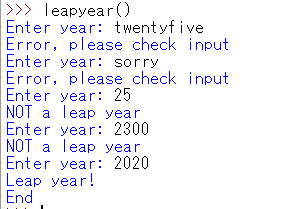
Here are a couple of playthroughs that demonstrates what the output would look like.

Playthrough 1:  Please download the PDF from the link or by looking at the image here.

Playthrough 2:  Please download the PDF from the link or by looking at the image here.

The code works by generating a message depending on whatever the user inputs in the "Enter year:" line.  If the user enters a year that's not a leap year, it will return a "NOT a leap year" message.  If the user enters a year that is a leap year, it will return a "Leap year!" message. If the user enters a word that isn't a number, it will return a "Error, please check input" message.  The user can continue to enter numbers for as long as they like until they enter a leap year, then it will be the "End."  

Final messages

I hope you've enjoyed this month's post as well!  I've made a few changes in my writing style since my last project-related post. The code itself was pretty easy to make, and if you've made your own versions of leap year checker codes, then I'd be pretty excited to see them πŸ˜ƒ  As always, please feel free to leave a comment or send me a message.  Contact information can be found on the Contact Me page.

I haven't figured out what project I'll be doing next month πŸ˜‚ But rest assured I still plan to keep posting for the foreseeable future πŸ’—  Please check out the archives section, for my past posts until next month!  


Thursday, April 8, 2021

AUTISM AWARENESS (or ACCEPTANCE) MONTH 2021

If you're new here:  WELCOME!!!  If you've been here before:  WELCOME BACK!!! For those of you who have been reading my posts, you may be more accustomed to reading about Python projects or related content.  But my blog name is "Chronicles of a Neurodivergent Programmer" so I thought it would be befitting if I talk about neurodiversity for a change, especially for Autism Awareness (or ACCEPTANCE) Month πŸ₯³  If you have read the About Me page, then you would know that I am autistic.  As such, it is important to me that people, autistic or not, are aware of autism and are accepting of the autism community.  

What is autism?

The diagnosis is now called "Autism Spectrum Disorder" or ASD for short.  If you're autistic you have:
  • Difficulties with social interaction
  • Difficulties with your senses and/or change
  • Been autistic your whole life (and will continue to be autistic)
While there are other common traits that are associated with autism, the above three are the core features.  Although autism tends to be described as a series of odd behaviors, autism would be better described as a difference in information processing.  Essentially autistic people will "see" the same thing, but "view" things differently.  It's better to say that autistic people tend to have a different perspective of things from the majority of people.  Different perspectives can lead to acting differently, and sometimes be perceived as inappropriate.

But acting differently or inappropriately from misunderstandings or different views is a universal experience of people, right?    So, does that mean everyone is on the spectrum somehow?  


Not really...  The autistic experience is pretty much about never being truly sure about whether you are acting "the right way" or not.  Let's use an analogy.  Let's say that people use either compasses or coordinates to navigate the world.  There are many more compass-users than there are coordinate-users.  Most of the directions used to communicate how to go to a specific location are more suitable for compass-users.  Coordinate-users would find it harder to navigate than compass-users because the directions are not communicated in a way that is easily understandable to them.  Likewise, when coordinate-users communicate directions using coordinates, compass-users are baffled.  It's not IMPOSSIBLE for compass-users and coordinate-users to communicate directions, but it can be DIFFICULT.  While a compass may have some compatibility issues with other compasses sometimes, it's not the same thing as a compass working like a coordinate.  Ultimately, people who have autism and don't have autism share human experiences but that doesn't mean that everyone is on the spectrum.

If people with autism don't think like people without autism, how would we communicate with each other?

Autistic people aren't just one giant monolith.  Not everyone acts the same, not everyone thinks the same, and not everyone shares the same strengths and weaknesses.  Much like when interacting with any individual, the best way is to engage with the person.  That being said there are a few pieces of advice from personal experiences:
  • Be honest and blunt (It might feel daunting if you're more comfortable with people "reading the room" but autistic people may "read" differently giving rise to misunderstandings.)
  • Reflect on your assumptions and expectations (If you're used to people doing things in a certain way, and someone doesn't do what you expect, don't assume it's a fault of theirs.  If in doubt, ask them so you can understand their point of view before being confrontational.)
  • Be understanding of differences (Being fixated on normality won't really get you anywhere, difference isn't always bad and it can even be a good thing.)

I don't have autism and I don't know anyone who does, so why should I support autism acceptance?


Current statistics say that about 1-3% of the human population is autistic.  That might seem like a very small percentage but that would end up being millions of people around the world.  Chances are you have met someone who has autism.  Even if you haven't, you will probably meet someone autistic in the future.  Human beings live in societies to survive so being able to build relationships with different kinds of people will be beneficial to everyone.  So... why not support autism acceptance?

In fact, my support for autism acceptance is found in the blog logo!

What went into the blog logo?

Golden 🐍

Haha ok I am aware that the python looks more yellow than "golden" but there is are a few reasons why I call it the golden python:

  1. Au is the chemical symbol for gold ✨✨✨ and the first two letters of Autism
  2. Gold is rare and so are autistic people
  3. Gold is valuable and so are autistic people (because we are awesome!!!... and also because we're rare I guess LOL)
  4. Gold is useful and so are autistic people (much like how gold is used for phone parts, autistic people can, and do, contribute to society)

The reason why I used a python was because... I primarily talk about Python coding on this blog πŸ˜‰  Actually... no wait there is another reason.  Variations of the infinity symbol ∞ have been used by advocates representing Autistic Pride.  I had the mouth of the Python join the tail as a reference to the Ouroboros symbol representing wholeness or infinity.


🌈🌈🌈


The term "spectrum" from ASD refers to the various ways that autism can present in each person.

"You met one autistic, you met one autistic."  

The rainbow is also a nod to the overlap between the LGBTQIA+ community and the autistic community.  Autism can be found in people of all races, religions, gender, sexual orientation etc.  There is diversity in almost all aspects of life that I can think of, and autism is also very diverse. 

πŸ’•πŸ’›


The heart refers to loving both python coding and autism.  It also refers about being accepting of people from different walks of life in general.  🀟🀟🀟

What can we do to support autistic people during (and after) Autism Acceptance Month?

The first step would be to listen to autistic voices!  There are plenty of advocates out there that talk about autism and organizations that work to support autistic people.

Here are a list of my favorite autistic YouTubers (in no particular order):
My favorite autism support organization is Spectrum First (especially relevant for those of you from the UK) 
One of the few companies dedicated to supporting autistic adults and is proactive in hiring people with all sorts of neurological conditions.

BONUS:

I hope you all have enjoyed my autism awareness/acceptance post!  For those of you who come here to read about Python coding, don't worry I have been learning more skills and working on new projects.  Next month I will be posting a Python project so check that out when it releases!  If you haven't seen my previous works before, check out the Blog Archive section.  


See you all next month!!!


Wednesday, March 10, 2021

Project 4: 3 times the... GAME OVER

Welcome back to my blog for this month's post!  Somehow, I've just realized that I didn't need to rewrite the post titles each time!  πŸ˜…  Previews are a lot more valuable than I initially thought...  Anyway, this is my third and FINAL post in what ended up becoming my Guess the Number series.  If you would like a re-cap for my previous Guess the Number posts, here is Project 2 and Project 3.  

As you may have guessed from the title, I will talk about how I implemented a "game over" after a limited number of guesses.  My previous posts introduced codes that would allow users to make guesses as to what number the program has chosen, but the user was given an unlimited number of guesses.  Many people who have ever played games would know that a game with no changes in difficulty, limitations or consequences can become quite dull after a few playthroughs.  In this final instalment of Guess the Number, I will introduce two codes that give the user three guesses, and if the user gets them all wrong, the game will declare a game over.  

I won't be introducing any new types of functions and operators this time, but rather use nested if statements and add extra lines defining the conditions.  There are two versions of the updated game.  In both versions, if a number below 1 or above 10 was entered, the response will be an error message suggesting that they have guessed a number outside of the range.  However, in the first version the user will lose a guess if they type in a number outside of the range and in the second version they will not.  I decided to write about both versions of the game in this post because I found it interesting that despite the first version arguably being the harder game, it was actually the easier code to plan for.  

First version code:  You can view the code below by either downloading the PDF from the link or by looking at the image posted here.

Code PDF:  Loss of chances 


Here's a list of statements that I've added to implement a game over:

  • c=3
    • Allows Python to define c as 3
    • The user has three chances to guess the correct number 
  • c=c-1
    • Every time the loop is repeated, the new c is minus 1 of the old c
    • The user originally has three chances.  If they get one guess wrong, they lose one chance and is left with two chances.  If they get another guess wrong, they lose another chance and is left with one chance...
  • if c>0
    • As long as the user hasn't run out of chances, they will receive a statement regarding their input (and the number of chances they have left)
  • else
    • In this case, if c is 0 or smaller
    • When the user runs out of guesses, they will receive a "GAME OVER"
First version playthroughs:  You can view the outcome of the playthrough by downloading the PDF from the link or by looking at the image here.


Second version code:  You can view the code below by either downloading the PDF from the link or by looking at the image posted here.

Code PDF:  No loss of chances 

 
The additional statement:
  • c=c+1
    • Before the loop c=3
    • During the first loop c=2 because c=c-1
    • But when the user types in a number lower than 1 and above 10, c=3 again because c=(c-1)+1
Second version playthrough:  You can view the outcome of the playthrough by downloading the PDF from the link or by looking at the image here.


See how adding a few simple equations can build a GAME OVER?  Before I started coding, I never really knew how games seemed to figure out how I made the wrong move, but at least now I see that it's more-or-less a matter of getting the program to recognize specific patterns as either "wrong" or "right."  I thoroughly enjoyed making Guess the Number minigames and I hope you enjoyed reading about my journey!  However, I would like to move on to other projects to diversify my coding skills, so stay tuned for future posts πŸ˜™

As always, let me know what you thought of my codes πŸ˜€  Do you have any better ideas as to how to make Guess the Number?  Leave comments below or if you prefer to contact me personally, check out the Contact Me page.  πŸ‘

The next post will NOT be a project but will most likely be a storytime πŸ˜‹  Nevertheless, it is something that I have planned to write about for some time now and I hope it will be an interesting read πŸ˜‰


A New Frontier: Building bots without code!!!

 Dear Readers,  Welcome back to this month's Chronicles of a Neurodivergent Programmer.  Last month, I took a break from writing about t...